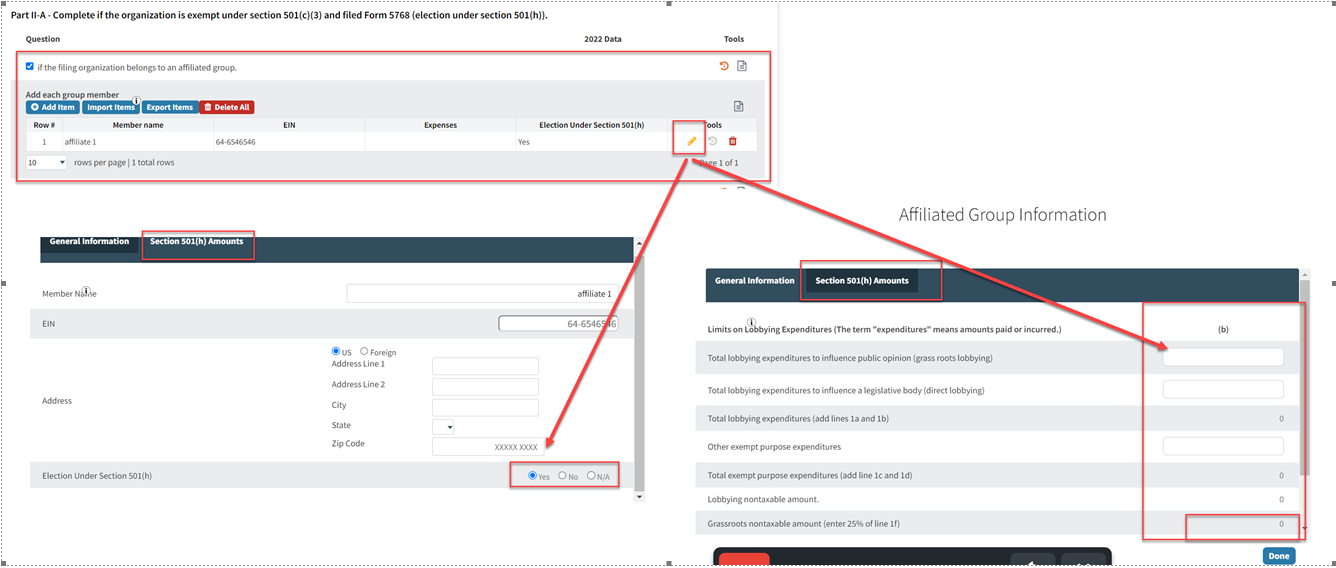
Issue: Column (b) is greyed out because filing organization belongs to an affiliated group.
Resolution: Add all other members of the affiliated group In the “Add each group member” Table.
How to Resolve:
- Use the "Add Item" or Import Items (template) to add each group member
- Upon adding/editing group member select appropriate answer for 501(h) election at bottom.
- If YES then the tab “Section 501(h) amounts” will be activated and client will input lobbying expenditures for the group member being added/edited. Amounts added here will be included in column (b).
- If NO then “Section 501(h) amounts” tab is grayed out and Expenses field will appear below the election box and client will enter expenditure from group member there.
- Continue the same for all other group members being added.
- The data will now flow to Schedule C, Part II-A, Column (b)