Error Messages
- The element 'RentalIncomeProperty' in namespace 'http://www.ftb.ca.gov/efile' has invalid child element 'RentReceivedAccrued' in namespace 'http://www.ftb.ca.gov/efile'. List of possible elements expected: 'USAddress, ForeignAddress, PropertyDescription' in namespace 'http://www.ftb.ca.gov/efile'.
- The element 'RentalIncomeProperty' in namespace 'http://www.ftb.ca.gov/efile' has invalid child element 'LessThan50Percent' in namespace 'http://www.ftb.ca.gov/efile'. List of possible elements expected: 'AttributablePercentage' in namespace 'http://www.ftb.ca.gov/efile'.
- The element 'RentalIncomeProperty' in namespace 'http://www.ftb.ca.gov/efile' has invalid child element 'AttributablePercentage' in namespace 'http://www.ftb.ca.gov/efile'. List of possible elements expected: 'USAddress, ForeignAddress, PropertyDescription' in namespace 'http://www.ftb.ca.gov/efile'.
- The element 'RentalIncomeProperty' in namespace 'http://www.ftb.ca.gov/efile' has invalid child element 'LessThan50Percent' in namespace 'http://www.ftb.ca.gov/efile'. List of possible elements expected: 'RentReceivedAccrued' in namespace 'http://www.ftb.ca.gov/efile'.
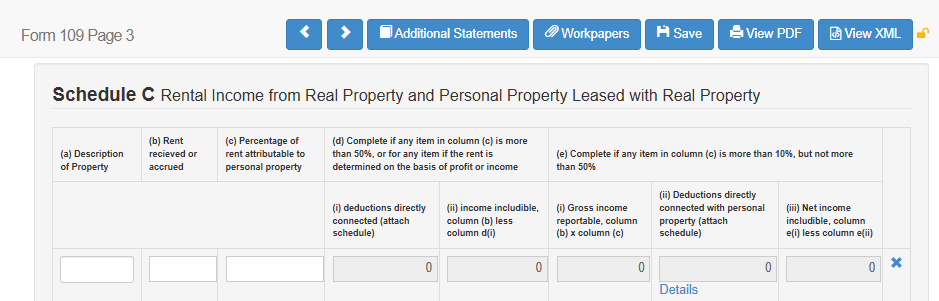
Issue: Missing Data: CA Form 109, Schedule C
How to Resolve:
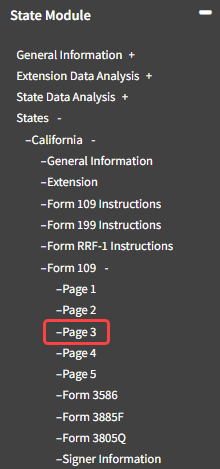
- Navigate to State Module -> States -> California -> Form 109 -> Page 3
- Fill in any missing data for Schedule C
- Click the "Save" button
- Submit the CA 109 State Return