
Before you begin:
- You need the Client ID and Client Secret for the application that was set up for K1 Aggregator in your Thomson Reuters account. See GoSystem Integration Setup.
- You need access to your own Thomson Reuters login. The connection test requires you to sign in.
Test the connection:
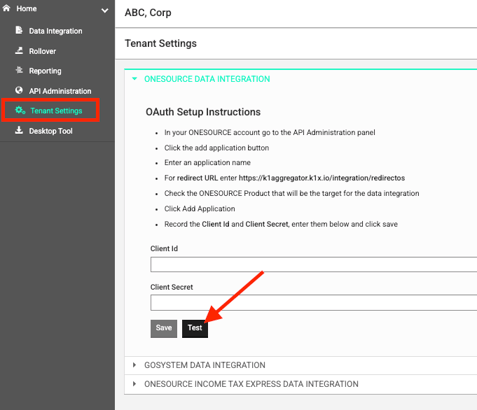
- In K1 Aggregator, go to Home > Tenant Settings > GoSystem Data Integration. For OneSource Income Tax, open ONESOURCE Data Integration instead. For OneSource Income Tax Express, open ONESOURCE Income Tax Express Data Integration.
- Confirm that the Client ID and Client Secret are entered.
- Select Test. A Thomson Reuters sign-in page opens.
- Sign in. You return to K1 Aggregator, where a success message appears.
If the test does not complete, ask your IT team or Thomson Reuters support for an updated Client ID and Client Secret. If an error message appears instead of a success message, contact support.
A successful test confirms that the credentials work. It does not confirm that the return you are sending to can be found. You can pass the test and still receive "Problem routing payload".
Resolve "Problem routing payload to GoSystem"
This error means that K1 Aggregator connected successfully but could not deliver the data to a return. Check each item below.
- Client ID and Client Secret: confirm that they are current and belong to the application used for K1 Aggregator.
- Return Locator Code: confirm that it matches the return in GoSystem.
- Thomson Reuters account number: confirm that it is the account number for your firm.
- Activity Numbers: confirm that each investment's Activity Number matches the activity in the return.
- Partnership EIN and Recipient EIN: confirm that they match the K-1 and the return.
- Data connection: if every item above is correct, ask Thomson Reuters support to confirm that the Data Connection for your account is active. In some cases the connection must be activated before data can be delivered.
After you correct an item, send the investment again.
OneSource Income Tax and OneSource Income Tax Express
OneSource Income Tax (OIT) and OneSource Income Tax Express are different products with separate connection settings. Confirm that you entered the credentials for the product you use.
If you receive "Problem routing payload to Income Tax" and the setup fields are complete, request a new Client ID and Client Secret and contact Thomson Reuters support. The error does not identify which setting needs attention. See Required Fields for Successfully Sending Data from K1 Aggregator to OIT.
Use K1 Aggregator in more than one environment
A Thomson Reuters application has one callback URL. If your firm uses K1 Aggregator in two environments, a send that starts in one environment can return to the other and fail with an authorization error (401).
- Ask your Thomson Reuters representative to provision a separate application for each K1 Aggregator environment.
- Enter the Client ID and Client Secret for each application in the matching environment.
Contact Support
If the error continues, email support@k1x.io with the tenant, tax year, instance, Return Locator Code, Activity Numbers affected, the exact error text and the time of the send.