
How to Enable Schedule of Activities Extraction
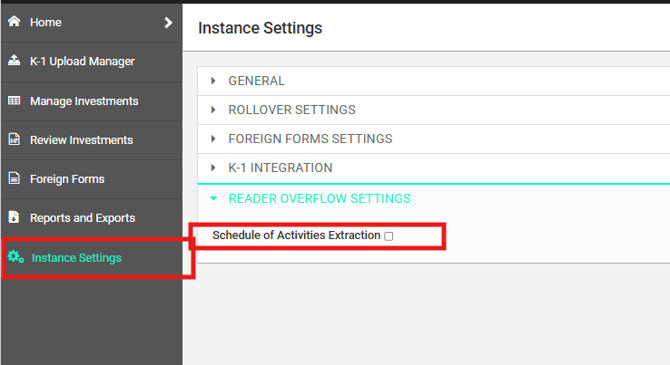
- From the left navigation menu, select Instance Settings.
- Expand Reader Overflow Settings.
- Select the Schedule of Activities Extraction checkbox.
- Save your changes, if applicable.
Important: This setting must be enabled before uploading K-1s into K1 Aggregator. If it is not enabled beforehand, the underlying activities will not be extracted for those uploaded K-1s.
When Schedule of Activities Extraction is enabled, K1 Aggregator can create and display all underlying activities for an investment that contains multiple activities after the K-1 is processed.
For example, if a single investment contains both federal and state activities, the investment's Fed/State view will display each underlying activity after extraction.
Limitation When Preloading Investments
If you plan to preload investments before K-1s are available, follow these guidelines:
- Create one investment only, either:
- manually, or
- by using the upload template.
- After the K-1 becomes available and is dragged into K1 Aggregator, the extraction process will automatically create the underlying activities, provided Schedule of Activities Extraction was enabled beforehand.
Warning: Do not use the upload template to create one investment for each activity. Doing so causes the system to create duplicate investments, with each activity being treated as a separate investment instead of multiple activities under a single investment.