
Before you begin
- Form 8879-TE is available when the engagement is filed as an ERO. Engagements filed as an Online Filer get Form 8453-TE instead. See How Do I Add the 8453-TE Signature Form?.
- Unlock General Information and Paid Preparer if they are locked.
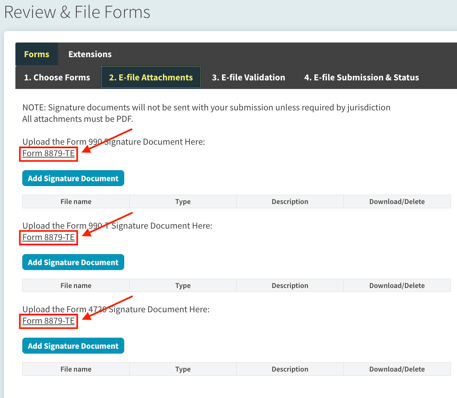
Download Form 8879-TE
1. Open Tax Forms, then Review & File Forms, then File Forms.
2. On the Forms tab, lock the form you are filing and check e-file, then go to Step 2, E-File Attachments.
3. In the top left section, click Form 8879-TE to download it.
 You can also include the signature authorization in a printed package. See 990 Tracker Guide | Package Printing.
Where each part of the form comes from
|
On the form |
Source in 990 Tracker |
|
Organization name, EIN, tax year, return type and amounts |
The engagement and the return you are filing |
|
Officer name and title (Part II) |
Basic Data, General Information, Signers: Name of Person who will be Signing Returns and Signer's Title. For Form 990-T and Form 4720, a different signer applies if you answered Yes to Are the 990 and 990T Signers different? |
|
Officer boxes in Part II |
Marked automatically |
|
Officer PIN |
Created automatically, not entered. It is the last five digits of the organization's EIN |
|
ERO firm name |
Basic Data -> Paid Preparer. If the Paid Preparer and the ERO are different, the ERO Information section is used. Blank for self-prepared returns |
|
EFIN and PIN (Part III) |
EFIN followed by the last five digits of the Firm EIN. If the Paid Preparer and ERO are different, the ERO EIN is used and must be present. If self-prepared, the organization's EIN is used |
|
ERO signature and date |
Filled in only when Digital Signature is Yes on the Paid Preparer page. Otherwise they are blank for a handwritten signature |
For a return on a full calendar year, the beginning and ending dates are left blank on the form and only the year is shown. This is expected.
Fix a blank or incorrect field
Officer name or title is blank. Open General Information, Signers, enter the name and title, and save.
Officer PIN is blank. The PIN is created from the organization's EIN when the Signers information is saved. Confirm Employer Identification Number is entered in General Information, then save the Signers section again.
ERO firm name, EFIN or PIN is blank or wrong. Open Paid Preparer. Enter the Firm EIN, or the ERO EIN if you answered No to Are the Paid Preparer and the ERO the same. The EFIN field is read-only. Save, then download the form again.
ERO signature or date does not print. Open Paid Preparer, set Digital Signature to Yes, enter the Signature Date, and save. To print the form without the preparer signature, set it to No. See Remove Paid Preparer's Signature.
Notes
- The PIN on Form 8879-TE is the same value that e-file validation checks. A blank value on the form often goes with the PractitionerPINGrp validation error. See Validation Error | 'PractitionerPINGrp' Is Incomplete: PIN Is Missing.
- Form 8879-TE is not submitted to the IRS with the return. Keep the signed copy for your records. See 990 Tracker Guide | E-File Workflow.
- If a field is still wrong after you correct the source, click Get Help in the app or in our Help Center. Include the product, engagement name, tax year, the field that is wrong, and a screenshot.